Building a tool server
A tool server (an MCP server) gives your agents and clients new tools, for example to read a ticket system or to write into a wiki. In Labtagon AI OS you do not run it yourself: you describe it, your assistant writes it with you, and AI OS builds it, checks it, runs it in the cluster and records every call. Nothing runs until you turn it on.
Start one
Section titled “Start one”- In Studio, open More to make beside New agent and choose New server.
- Under What it should do, describe the tools in your own words.
- Optional: a Name, what to Start from (Python, Node, or A service’s own MCP server, which needs no code), and Shape it like an existing one.
- Click Build it in a chat.
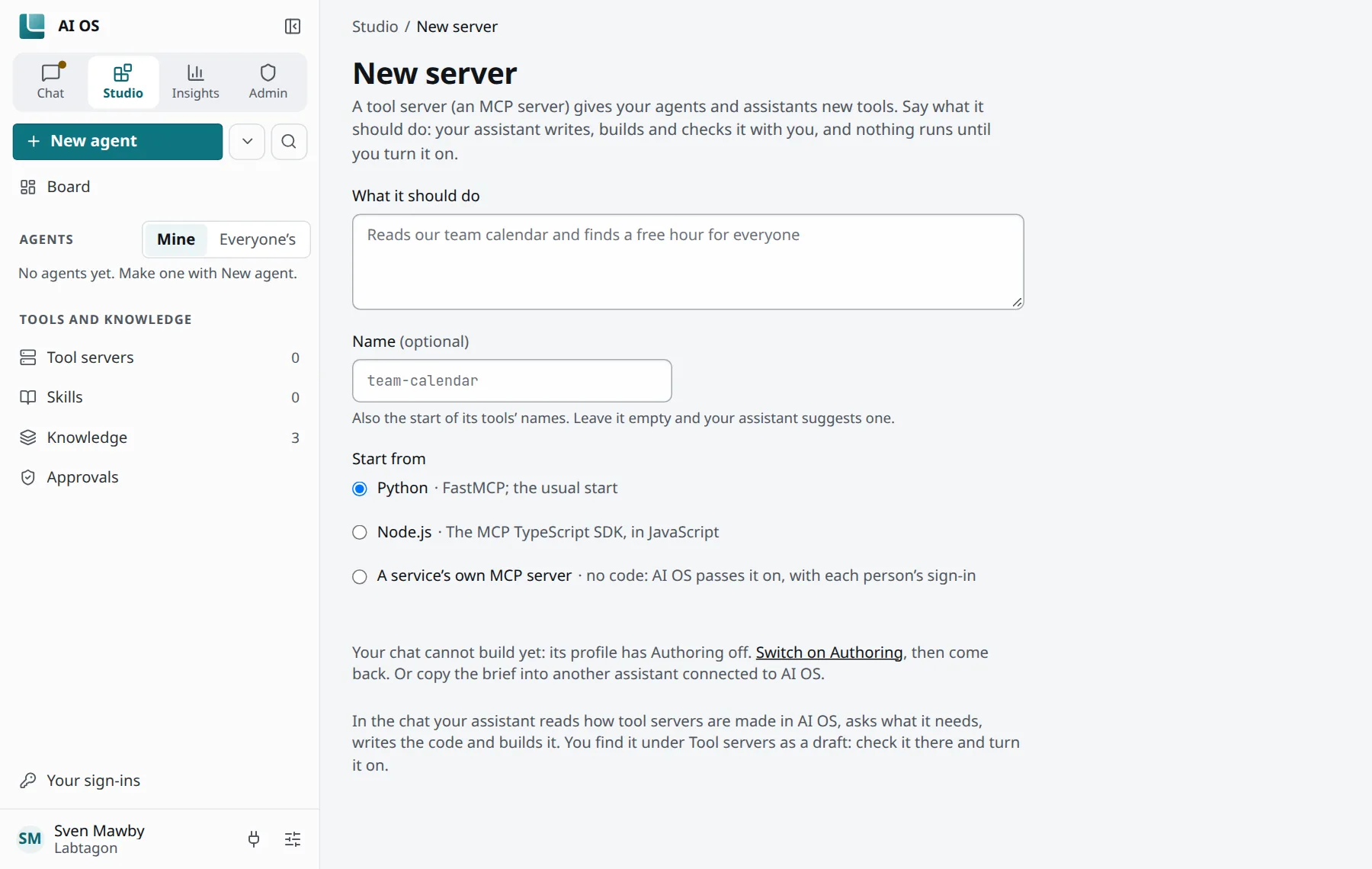
The chat can build only when its profile has Authoring on. If it is off, the page says Your chat cannot build yet: its profile has Authoring off. and offers Switch on Authoring. Your organisation decides who may build at all (the permission Build).
Connect an MCP server on the same page adds a server that already runs elsewhere instead.
Building from your own client
Section titled “Building from your own client”Claude Code, Codex or another client does the same with AI OS’s studio__* tools, once Authoring is
on in its profile. The skill mcp-authoring (skills__get) tells it how. The steps it takes:
- Look first whether something fitting exists (
studio__servers,studio__catalog). - Create the server (
studio__create_server, with a template:python,nodeorsaas). A name is 2 to 16 lower-case letters, digits and hyphens. Until its first version is accepted, the server is listed as not set up yet, and its name is reserved. - Write its files (
studio__write_file,studio__apply_patch,studio__update_config) or bring them as an archive (studio__import). - Build it (
studio__build). The build installs the dependencies in the cluster and runs the checks below. - Propose the change (
studio__propose). It becomes a changeset you review at its address in the console.
The checks of a build
Section titled “The checks of a build”Every build runs these steps (ADR 0052):
- An SBOM of everything installed (syft).
- Known vulnerabilities and malicious packages among the dependencies (osv-scanner, with the vulnerability data AI OS keeps).
- A code check (bandit for Python, eslint-plugin-security for Node).
- The server’s own tests (pytest or
node --test).
During the build, the server can download only from the npm registry and PyPI, unless your organisation allows more.
By default (checks.mode block):
- A malicious package or a failing test means the version cannot be accepted.
- A critical vulnerability, tests that did not finish, or a check that could not complete need a tick from the person who accepts it, saying they saw it.
- Code notes and licence warnings never block.
- Agents cannot give that tick; a person does.
Reviewing and accepting
Section titled “Reviewing and accepting”A changeset shows the changed files, the checks under Safety scan, and What it may do differently: new hosts it reaches, new keys or sign-ins it uses. These are rights you approve. Accept releases the version.
- A change to a new server or skill: you accept it.
- A change to an existing one: its owner and its Maintainers accept it.
What a server may reach
Section titled “What a server may reach”A tool server reaches the internet only through AI OS’s egress gateway, and only the hosts its
version names (spec.egress). Wildcards such as * or a whole public suffix are refused. For each
host it can also declare API rules: which methods, paths and operations it sends (ADR 0054).
Everything else there is refused before any key is filled in. A new or wider host waits for approval.
Keys and sign-ins
Section titled “Keys and sign-ins”A server never sees your keys in its code: it works with placeholders (spec.secrets), and the
egress gateway fills in the real value only on the way out, only toward the hosts the key belongs to.
For services with OAuth, the server names a connection; its client id and secret are entered by
administrators. Each person then signs in once and picks the sign-in in their profile.
Roles on a server
Section titled “Roles on a server”| Role | May |
|---|---|
| Owner | Everything, also giving the Maintainer role and deleting the server. |
| Maintainer | Change, rename and describe it, accept changesets. |
| Editor | Propose changes; the owner or a Maintainer accepts them. |
| Viewer | See its code and calls; write nothing. |
Publishing
Section titled “Publishing”Under Access → Who can use it you choose who finds the server: Only you, Groups or Organisation. Widening it is Request approval: who approves is set by your organisation’s Approvals policies; without one, its administrators approve.
Versions and rolling back
Section titled “Versions and rolling back”By default everyone uses the newest accepted version (setting Everyone uses the newest version).
Under Versions you see each version’s state (Everyone uses it, Proposed, Accepted,
Rejected, Withdrawn) and Version everyone uses. Roll back to … goes back to an older
one; say why: the people who use it see the reason. From a client, studio__revert makes a new
version with the old files.
While it runs
Section titled “While it runs”- A server’s page has the sections Details, Skills, Tools, Versions, History, Access, Analytics and Files.
studio__logs,studio__callsandstudio__usageshow its logs, its failed calls and its use.- A server nobody calls goes to sleep after 15 minutes by default and wakes on the next call.
- Deleting a server (
studio__delete_server) is held until you approve it.